-
Smite Scoreboard App Summer Refresh
 Well summer is approaching, and that can only mean one thing, yep breaking out your Smite set and challenging friends and family to some good old garden game fun.
Then it’s the hunt for a notebook and a pen to keep scores, and then the game goes on longer than you thought, and your scorecard quickly turns into a mass of scribbles and illegible numbers. Before you know it you’re writing above, below and and around the edges of the paper.
That’s why I wrote the Smite Scoreboard app which my family uses whenever we get together, and the weather is kind to us (sometimes when it isn’t).
Since initially developing the apps I’ve addressed the odd bug that snuck through and added the odd feature request, e.g. the ability Undo a Score, but this year it looks like I’ll have my work cut out as a couple requests have come in that I think will be great improvements to the existing functionality.
These changes, along with those driven by the underlying platforms and the respective Stores, look like they will keep be occupied for a little while, but I’m currently hoping to have a release ready for the end of May.
Read more -
A New Start in 2026
 2026 is a new start for me and while I’m looking forward to the next twelve months, this optimism has come at a cost.
The cost has been the closure of my Limited Company that I setup in 2023 and marks my departure from the world of contracting and my return to regular employment.
Now I’m fortunate in that I’m returning to work for not only a previous client, but also a previous employer who reached out to me with this opportunity. I clearly tick all their boxes, and they know I can do the job they need me to do.
So although there will be challenges ahead, my new role will see me helping drive their product forward; I do need something outside of work to keep my mind working.
Read more -
Contracting is Dead in the UK

When I started contracting back in 2011 the market was buoyant and it was not unusual to be fielding multiple calls a week (or day) from recruiters asking whether you were available or not. This meant that when you were coming to the end of one contract you normally had another secured to follow on. Life was good.
Then Covid happened and the whole landscape changed with the contract market essentially imploding overnight. Unfortunately, when the world started to get back to normal the contract market didn’t follow suit, it remained pretty much stagnant.
The primary cause of this can be leveled at IR35 and the Off-Payroll changes rolled out to the private sector in April 2021. Now, I’m not going to try to explain the abomination that is IR35 because that’s not going to achieve anything, it will make this a very long and boring post and frankly it isn’t going away, so there is no point banging on about it.
The long and the short if it is …. I’m out … I’m done with contracting and that’s that!
But where does that leave me, because the permanent job market isn’t a great deal better.
Read more -
The Day I Cancelled Pluralsight
 Back in early 2012 I watched an online course on Pluralsight - Data Layer Validation with Entity Framework 4.1+ by Julie Lerman.
It was the first of a great many courses I’ve watched since then and I’ve learned a lot.
But in recent years I’ve found that I’ve spent more time watching other high quality courses elsewhere.
Previously there wasn’t anything like Pluralsight - sure, there was YouTube but the quality just wasn’t there. You could find some useful content but it fell short of the quality of the courses on Pluralsight.
Read more -
Adding Clustering to MAUI Maps on Android
Over the years I’ve developed a number of mobile applications that require the ability to display a number or locations on a map.
The challenge comes when there are a large number of locations to display because the map very quickly becomes overwhelmed with marker pins - but only really on Android because Apple Maps provides a degree of clustering out of the box.
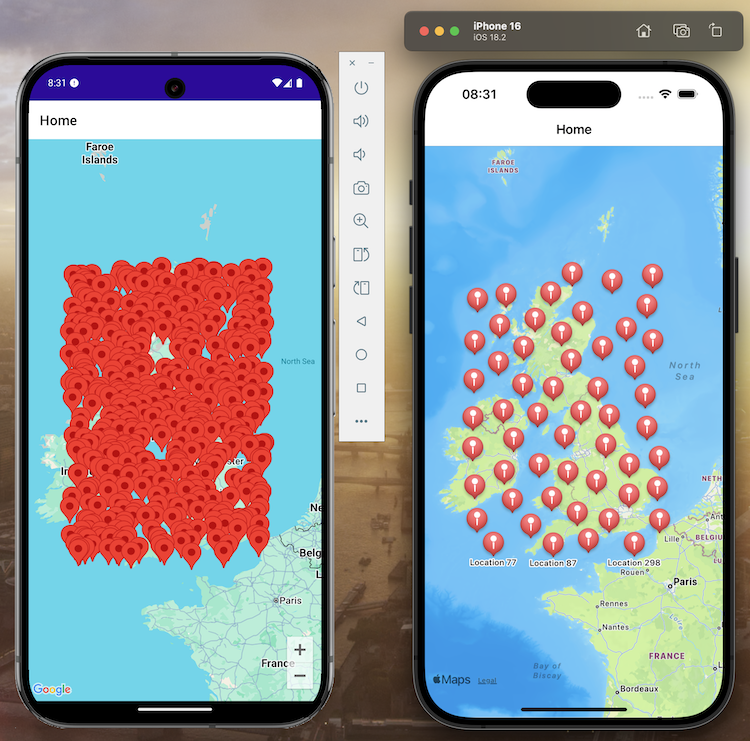
The above images show the difference between the standard Android and iOS maps with 500 markers randomly dropped onto them and as you can see, Android isn’t really cutting it as the UK landmass is pretty much totally obscured by the marker pins. While it could be argued that the iOS version is the lesser of the two implementations because there is clearly data missing, zooming in will cause more marker pins to be revealed.
In this post I’ll show you how to extend the functionality of the regular Android mapping implementation provided by the
Read moreMicrosoft.Maui.Controls.Mapspackage to include Marker Pin Clustering which, in my opinion, will improve the UX no end.